Send Automatic Signature Reminders with GetSign
Following up with signers manually wastes time and creates gaps in your document workflow. GetSign now lets you…

To keep your monday.com workspace organized and secure, it is essential to periodically clear out old and unused webhooks, especially those left behind by integrations like GetSign. You can now delete webhooks on monday.com created by GetSign. As your team’s workflows evolve on monday.com, you might find that some of your GetSign document signing processes are no longer needed. Perhaps a client contract template changed, an old approval step was removed, or a specific signing flow is now obsolete.
In such cases, you’ll want to clean up your workspace by removing any associated GetSign webhooks that are no longer active or applicable. This helps keep your automations relevant and your board tidy.
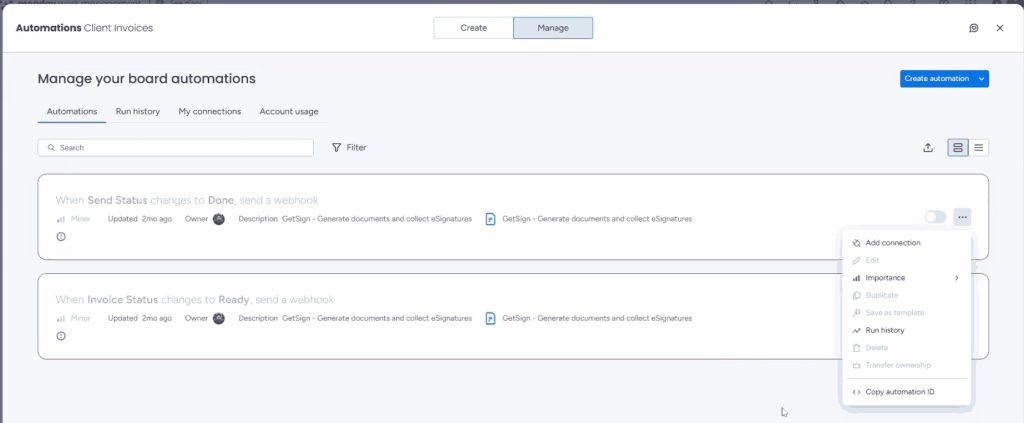
You may have noticed that when trying to remove a GetSign webhook directly from the monday.com automations section, the delete option is not accessible. Due to certain technical limitations within monday.com’s webhook architecture for integrated apps like GetSign, you cannot simply delete these webhooks yourself through the standard interface. This can lead to lingering, unnecessary automations.
To address this, Jetpack Apps provides a straightforward support process to help you remove any GetSign webhooks that are no longer needed. You’ll need to locate the unique Automation ID for the specific webhook within monday.com and then submit a request through our support portal. Our team will then promptly delete the webhook for you.
Tips, Caveats, and Best Practices
Once the GetSign webhook is deleted, you can confidently maintain a clean and optimized monday.com workspace. You’ll no longer have inactive or unnecessary automations running in the background, ensuring your boards and workflows are focused and efficient. This streamlines your processes and helps avoid any confusion or unintended triggers from old configurations.
Generate, send, sign and track documents without leaving your workflow.