GetSign MCP is now live. The AI-Native document workflow layer for your team. 🎉

One document. Hundreds of signatures.

Send one document to dozens or hundreds of recipients, give every signer a personalized secure link, and track every signature in real time — without leaving your monday.com board.

Send one-to-manyIndividual trackingAutomation-ready
One document.
Batch signatures at scale, without a separate workflow.
One click sends to manyTrigger the same signing workflow across selected items.
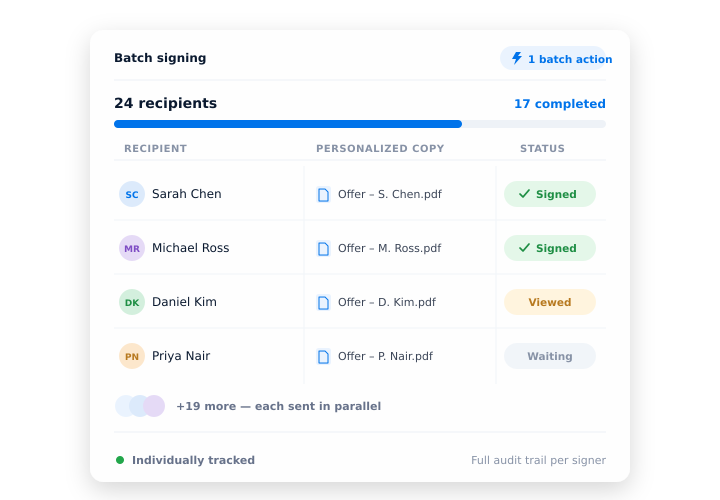
Unique links per signerEach recipient gets their own secure signing link.
Real-time statusSee signed, pending and overdue requests on the board.
Full auditabilityKeep every individual signing action traceable.
Effortlessly collect multiple signatures at once

Handle the same document for dozens of people — without repeating the send.

Need dozens or hundreds of people to sign the same document? Batch Signing makes it happen in minutes, not days. It’s your time-saving, automation-ready tool to handle contracts, policies, disclosures, and more — without copy-pasting or chasing signatures manually.

Multiply your impact — not your effort

Mass signing stays personal and individually trackable.

GetSign's Batch Sign capability is built for teams that need to send, manage, and track documents at scale. Whether you call it mass signing, bulk signing, or batch document signing — the workflow is the same: select multiple board items, trigger GetSign, and documents go out to all recipients simultaneously.As a batch document signing platform built natively into monday.com, GetSign eliminates the manual send-one-at-a-time approach. Every batch is tracked individually, so you know exactly who has signed and who hasn't — without switching tabs or exporting reports.

One click sends to manyIndividualized signer linksNo duplicate document creationTrack progress in real-time with full auditabilitySave hours weekly by automating repetitive signature requests

Experience the flow

From “send all” to “signed by all.”

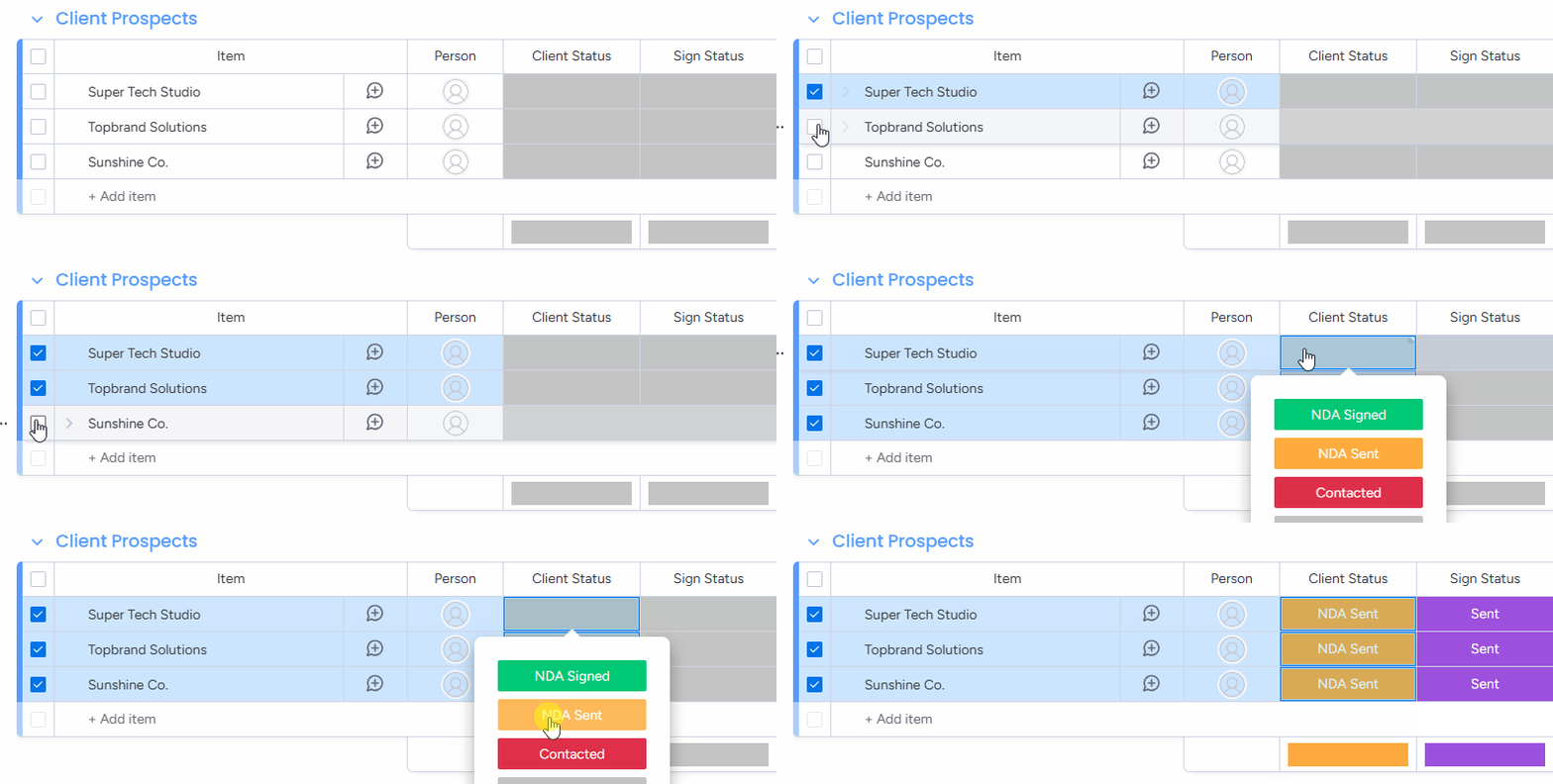
From “Send all” to “Signed by all” — Here’s how

01

Select the items from your board

Choose multiple rows (items) that require the same document to be signed.

Select the items from your board
Real-world wins

Batch signing for the teams with repetitive document volume.

Explore how different teams can streamline their workflows with GetSign.

HR & People Operations

Easily send policy acknowledgments, onboarding NDAs, or compliance forms to dozens of new hires — all at once.

Legal & Compliance

Distribute updated policies or compliance docs to every employee with a single click.

Sales Operations

Get signature confirmation on pricing agreements, service outlines, or renewal contracts from all active clients in parallel.

Finance & Procurement

Secure vendor agreement acknowledgements or budget sign-offs and track response in one place.

IT & Security Teams

Issue data access or confidentiality policies company-wide and monitor signature completion from a central board.

Built for high volume, high confidence

Whether it is 10 recipients or 500, the workflow stays controlled.

Whether you're onboarding 10 employees or sending policy updates to 500 recipients, Batch Signing handles it all without slowing you down.It's built for scale, designed for simplicity, and ready for every signature-heavy workflow.

Send once. Sign many.

Ditch repetitive manual work — handle mass signature needs in minutes.

Tailored links for every signer

Each person receives their own secure link and copy of the document.

Full visibility on every action

See who signed, who hasn’t, and what’s overdue at a glance.

FAQ

Frequently asked questions.

Batch Signing lets you send one document to hundreds of recipients at once — each with their own personalized signing link. No need to duplicate documents or chase people manually. It’s ideal for mass distribution of contracts, disclosures, or policy acknowledgments.

You can batch send by selecting multiple items (rows) in your monday.com board. Each item should have the document pinned and recipient details filled. Then, update the status column to a trigger label like “Send for Signature”. GetSign will automatically send personalized links to each signer.

No. You only need to upload or pin the document once per item. GetSign takes care of sending individual copies to each signer with their own tracking link.

Yes. Each signer receives a unique, secure signing link — and the document can be personalized using mapped fields from the board (e.g., name, department, pricing).

GetSign updates each item’s signature status in real time within your board. You can instantly see who signed, who hasn’t, and follow up accordingly.

Absolutely. Use monday.com automations to trigger GetSign actions. For example, when a status column changes to “Send for Signature”, a personalized signing link is sent automatically.

Batch Signing is perfect for:HR onboarding and NDAsLegal compliance acknowledgmentsSales agreements and renewalsProcurement/vendor approvalsCompany-wide IT or data policy distributions

No. Batch Sign is included as part of the GetSign capabilities suite — there’s no additional fee required to use it if you're already subscribed to a plan that includes capabilities.

Batch Sign on monday.com

Turn one document into a hundred signed agreements

Start collecting signatures at scale — securely, efficiently, and without repetition in monday.com.

One click sends to manyIndividualized signer linksNo duplicate document creation