How to Display Multiple Images in Document Templates with GetSign
When your monday.com board items contain multiple images, presenting them in a document or proposal has always been…

Following up with signers manually wastes time and creates gaps in your document workflow. GetSign now lets you set automatic reminder emails that go out to your signers at custom intervals. You control which intervals are active, how many reminders are sent, and it works for both new and existing GetSign setups on your monday.com board.
Open your GetSign setup: Go to your monday.com board and open your GetSign item view — either create a new setup or open an existing one to edit.
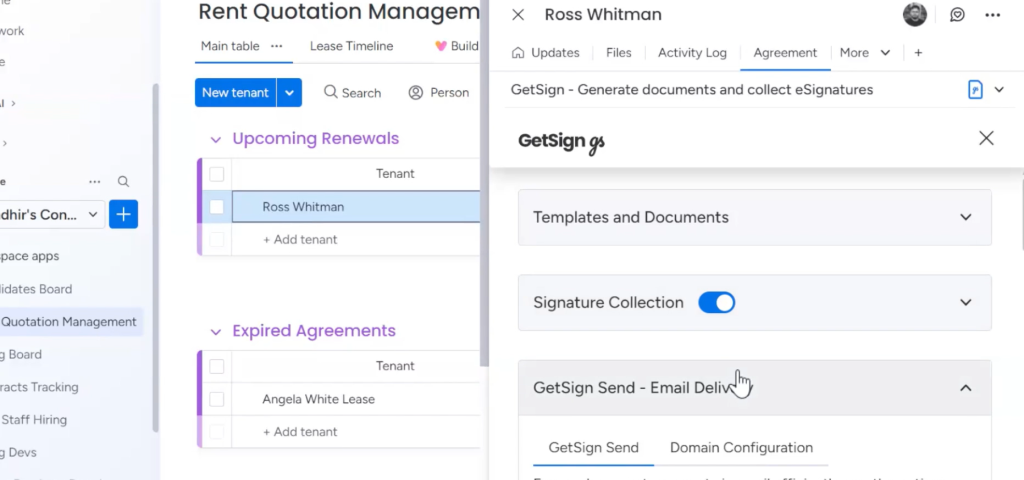
Find the Send Email Delivery section: Inside the GetSign setup panel, scroll to the Send Email Delivery section. You will see a new option labeled Send Automatic Reminder to Recipients.
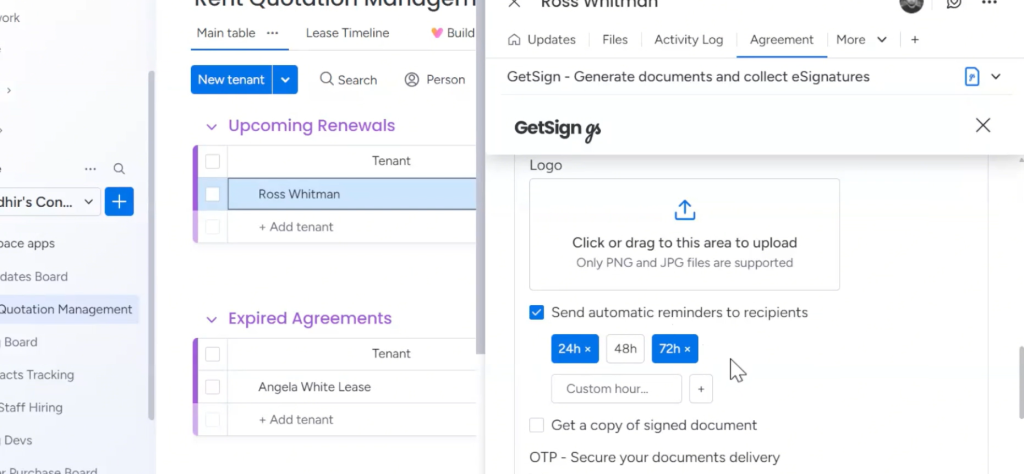
Toggle reminders on or off: Turn the toggle on to enable automatic reminders. If you turn it off, no reminder emails will be sent to signers at all.
Set your reminder intervals: By default, 24 hours and 48 hours are active. To remove an interval, click the X next to it. To add a custom interval, type the number of hours and click Add. You can have multiple intervals active at the same time.
Save your setup: Once your intervals are configured, hit Save. GetSign will automatically send reminder emails at those times for every document sent through that setup.
Signature reminders remove the manual follow-up step from your document workflow. Once configured in your GetSign setup, reminders go out automatically at the intervals you set — for every document, on every board item, across both new and existing configurations.
Generate, send, sign and track documents without leaving your workflow.