Send Automatic Signature Reminders with GetSign
Following up with signers manually wastes time and creates gaps in your document workflow. GetSign now lets you…

Managing payments and eSignatures separately leads to unnecessary friction, delays, and missed opportunities. With GetSign’s Stripe integration on monday.com, you can combine payment collection and document signing into a single seamless workflow.
This guide shows you how to set up Stripe with GetSign, send documents with built-in payment prompts, and track everything in real time within your monday.com board.
Stripe integration allows you to embed a secure payment step directly into your eSignature workflow. THis is how one collect Stripe payments during eSignature on monday.com. When recipients sign a document, they’re immediately prompted to complete a payment via Stripe. The process is fast, secure, and fully tracked within monday.com.
Connecting Stripe directly to monday.com using GetSign eliminates the need for middleman platforms like Zapier or Make, allowing you to set up native, zero-code payment automation entirely within your workspace. By linking your Stripe account directly in GetSign’s board settings, you can automatically generate dynamic payment links, trigger automated signature requests based on board status updates, and collect credit card or digital wallet payments directly during the document signing flow.
Once a transaction is complete, GetSign updates your board columns and item statuses in real time—giving your team complete visibility over incoming revenue, deposits, and contract execution without paid third-party connectors or complex multi-app maintenance.
| Feature / Capability | GetSign (Sign-and-Pay) | Native monday.com Integration | Zapier / Make Integration |
| Primary Goal | Collect payment during eSignature | Sync past transactions to board | Custom triggers & multi-app routing |
| Setup Complexity | Low (Native App Install) | Low | Medium to High |
| Requires 3rd-Party App? | No | No | Yes (Zapier/Make paid plans) |
| Payment Point | At point of document signature | After payment is processed | After external payment trigger |
| Automatic Status Updates | Yes (Updates board to “Paid”) | Yes | Yes |
| Best For | Deposits, retainer quotes, sign-offs | Invoicing record tracking | Complex custom business logic |
GetSign stands out by turning payment collection into a single, seamless step inside your existing monday.com boards. Instead of maintaining separate integrations or paying for external automation middleware like Zapier, GetSign connects directly to your Stripe account through a simple, one-click authorization in the Item View.
This native connection allows you to drop live payment fields directly onto your contracts and sync payment statuses back to your board items in real time. By merging document signature and payment into one friction-free workflow, GetSign ensures you collect deposits instantly upon signing while eliminating setup friction and recurring connector costs.
While sign-and-pay embeds a live Stripe checkout directly into the eSignature document so clients pay instantly upon signing—eliminating manual invoicing and securing deposits at the point of agreement—syncing Stripe charges focuses on post-transaction record-keeping by importing separately processed Stripe payment data back onto your monday.com board items.
In short, sign-and-pay combines contract execution and payment collection into a single, seamless step to accelerate upfront cash flow, whereas charge syncing automates background data tracking and status updates across your board after payments occur.
Below, we’ll walk you through how to set this up and collect payments with Stripe. Enables recipients to make payments as they sign. Link your Stripe account to receive payments from signers when they complete the document.

1. Open Your Board & Item:
– Log into your monday.com workspace and select the board where you manage eSignatures.
– Choose the specific item (e.g., contract or invoice) you plan to send for payment and signing.
2. Switch to the “GetSign” View:
– At the top of the item details, click the GetSign view to access settings, document uploads, and integrations.
Why This Matters: Centralizing everything in the GetSign view helps you avoid juggling multiple apps or browser tabs.
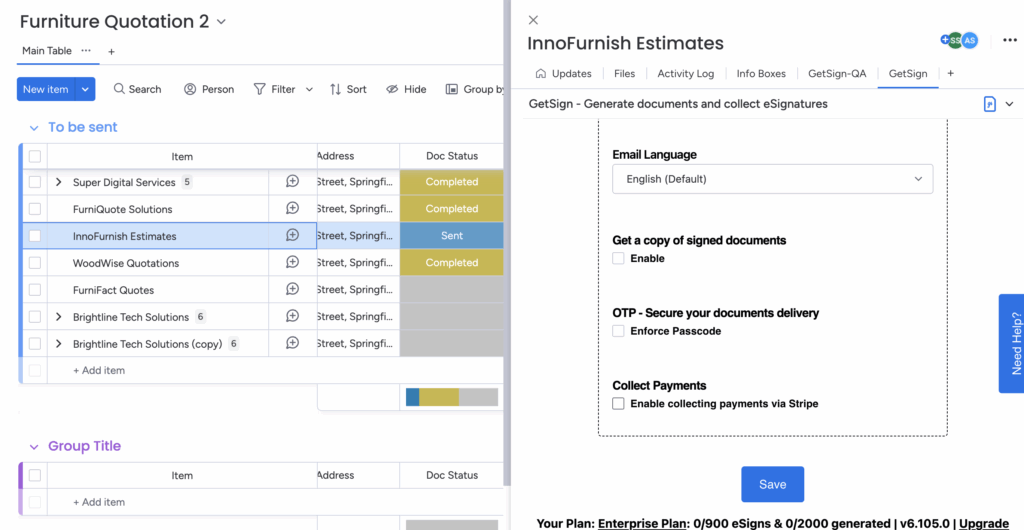
Navigate to Settings:
– In the GetSign view, locate the Settings section.
– Look for the option to activate Stripe or connect a payment system.

– Assign a status column and label (e.g., “Payment Required”) that will trigger the payment process.
– This ensures your monday.com board updates in real time once the payment is made.
Outcome: Your Stripe account is now linked to GetSign, allowing you to collect payments when recipients sign the document.

1. Open the Document Editor:Click “Prepare” to enter the GetSign signature builder.
2. Drag & Drop “Payment Item”Locate the “Payment Item” field in the standard board fields list.
Place it where you want the payment prompt to appear within the document.
3. Set Amount & Currency:Define how much the recipient needs to pay and in which currency (e.g., USD, EUR).
Save your changes to confirm.
Benefit: By specifying the amount and currency, you provide clarity for both parties—no hidden fees or confusion about the total cost.

1. Review Sender Details:
– Confirm your sender name and email in the GetSign settings to ensure professional communication.
2. Dispatch the Invite:
– Click “Send” to email the document and payment link to the recipient.
– Alternatively, copy a signing link to share via chat or CRM if you prefer.
3. Recipient Experience:
– They receive a branded email invite to sign.
– Once they sign, they’re prompted to complete the checkout process via Stripe.
Result: The entire signing and payment process is combined into one seamless step, minimizing friction for your customers.
GetSign’s Stripe integration is designed specifically for one-time, point-of-signing payments (such as upfront deposits, flat fees, or milestone payments attached to contracts).
If you require complex recurring subscription billing logic, automated usage-based meter billing, or multi-tiered Stripe billing schedules that occur far after contract signing, a dedicated middleware workflow like Make or Zapier synced to Stripe Billing may be a better fit for your operations.
Scenario: A creative agency sends contracts to clients and needs to collect a 50% deposit.
With GetSign and Stripe:
Result: No follow-up needed, no invoice delays, and fewer missed payments
You can connect Stripe to monday.com directly using the GetSign app. Simply open the GetSign view on any item on your monday board, go to Settings, select Connect Stripe, and authorize your account. This allows you to collect payments directly within your monday.com workflows without needing Zapier.
Yes! With GetSign for monday.com, you can embed a Stripe payment field directly into your eSignature documents. Recipients are prompted to enter their credit card or payment details to complete the signing process, ensuring you collect payments and signatures in a single transaction.
What payment methods are supported?
Stripe supports credit cards, debit cards, digital wallets, and more—depending on your account settings.
What happens if the payment fails?
The signature will still complete, but payment status will not update. You can follow up using board automations or manual review.
Is the integration secure?
Yes. Stripe uses PCI-compliant encryption and fraud protection. GetSign signatures are also legally binding and audit-ready.
Can I trigger automations after payment?
Absolutely. Use monday.com automations to change statuses, send alerts, or assign tasks once payment is received.
By combining payment collection with eSignatures, GetSign and Stripe on monday.com eliminate friction and simplify your most critical business workflows. Whether you’re sending invoices, collecting donations, or onboarding clients, you can:
Start using Stripe with GetSign today and bring all your signing and payment workflows into one place.
Generate, send, sign and track documents without leaving your workflow.