
Creating and sending professional quotes or invoices doesn’t need to involve external tools or manual work. With GetSign on monday.com, you can generate accurate, branded documents directly from your boards—using subitems for itemized line-items and automating calculations.
This guide walks you through using GetSign’s CPQ (Configure, Price, Quote) process and invoicing solution to streamline your sales or finance workflows.
Why generate quotes and invoices on monday.com?
- Centralized data: All client info, pricing, and calculations live in one place
- Integrated eSignature: Send quotes or invoices and collect signatures in one workflow
- Automatic calculations: GetSign handles totals, taxes, and credits with precision
- No switching tools: Everything stays inside monday.com—from input to approval
Use cases for GetSign’s CPQ & invoicing solution
1. Sales proposals
Assemble detailed proposals with products, pricing, discounts, and client info pulled from subitems and board fields.
2. Recurring invoices
Automatically generate monthly, quarterly, or annual invoices based on preset line-items.
3. Professional services
Consultants and agencies can quote project deliverables, timelines, and rates with ease.
4. E-commerce and wholesale
Bundle multiple SKUs into one invoice with taxes and credit applied per item.
5. Manufacturing & logistics
Break down quotes into components, shipping, and handling via subitem configuration.
Step-by-Step: Generating Quotes and Invoices on monday.com with GetSign
GetSign offers an excellent feature of document generation which makes it easy for generating quotes and invoices on monday.com. This step-by-step guide walks you through everything from setting up subitem line items to sending professional, eSignature-ready documents—all within minutes.
This YouTube video helps you generate documents automatically using your monday board data.
1. Install GetSign and get started in an item view
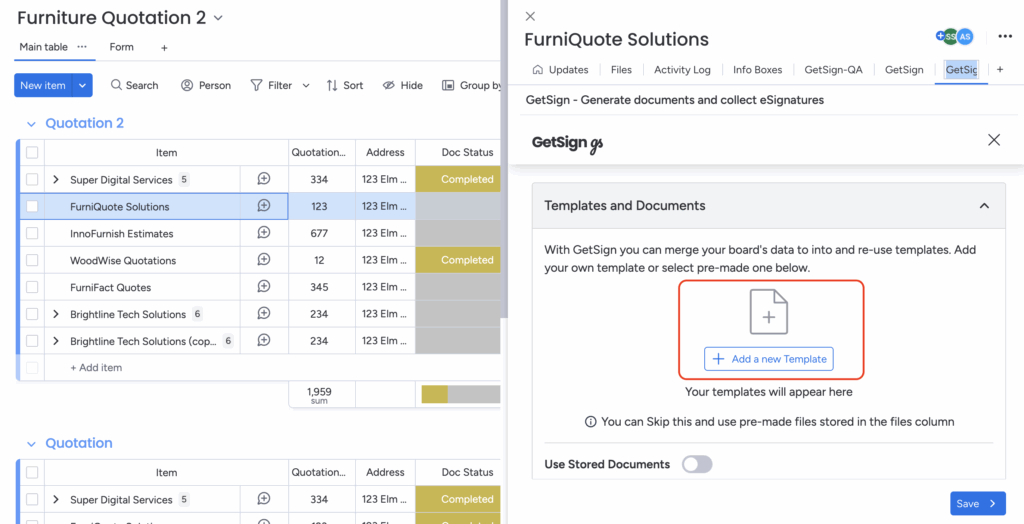
GetSign offers an option to upload a new document or a new template:
– Perfect for saving the generated quotes or invoices back to your board for future reference.
2. Effortless Document Upload

1. Click “Upload a New Template.”
– Add an existing invoice or quote template in PDF or DOCX format.
– If you don’t have one, create a fresh document right within GetSign.
2. Map Board Columns
– In the lower section, link relevant monday.com columns (like email, files, or status) to ensure real-time updates and secure sending.
3. Verify Sender Email
– After saving changes, GetSign prompts you to confirm your sender email address for added spam protection.
Outcome: A centralized template that can be reused for future quotes or invoices, eliminating manual duplication.
3. Toogle on ‘GetSign Generate’ and Incorporate Subitems as Line Items
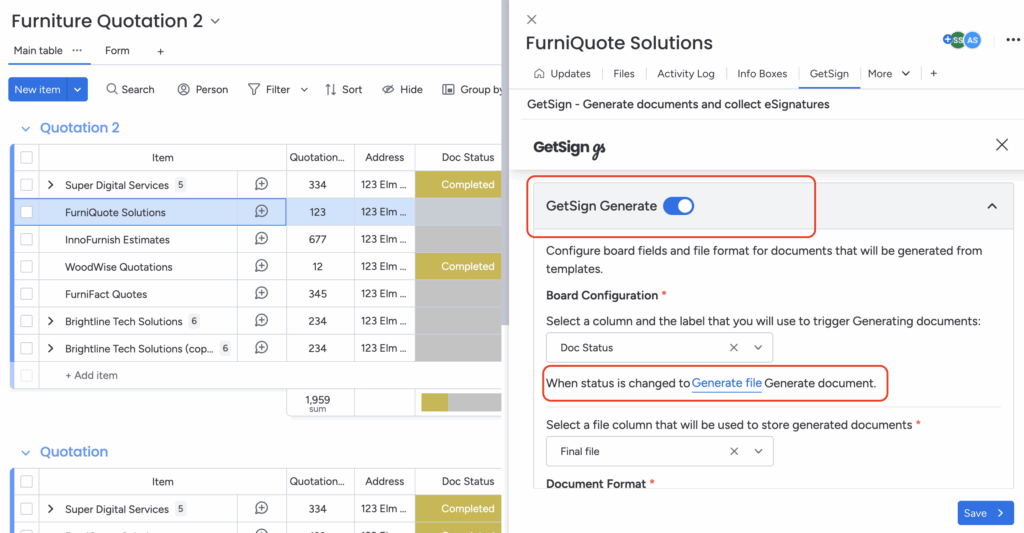
1. Toogle on GetSign Generate
– This will be used to generate document where you can add text fields, signatures, or line items.
2. Drag the “Line Items” Field
– Place it where you want the subitem details (like product name, quantity, or price) to appear in the final PDF.
3. Configure Columns
– Tap “Configure Line Item” to select which subitem columns you want to display (e.g., product name, quantity, unit price, discount).
4. Save Your Changes
– Once you’ve tailored the line items, click “Save” to finalize.
Important: Ensure your board subitems contain the data you want to reflect in the final document.
Benefit: Subitems let you break down quotes or invoices into detailed line items, ensuring clarity and precision in your pricing.
4. Send Your Quote or Invoice

– Review Fields & Signature Requirements
Double-check line items, totals, and any necessary signature or date fields.
5. Start sending your document
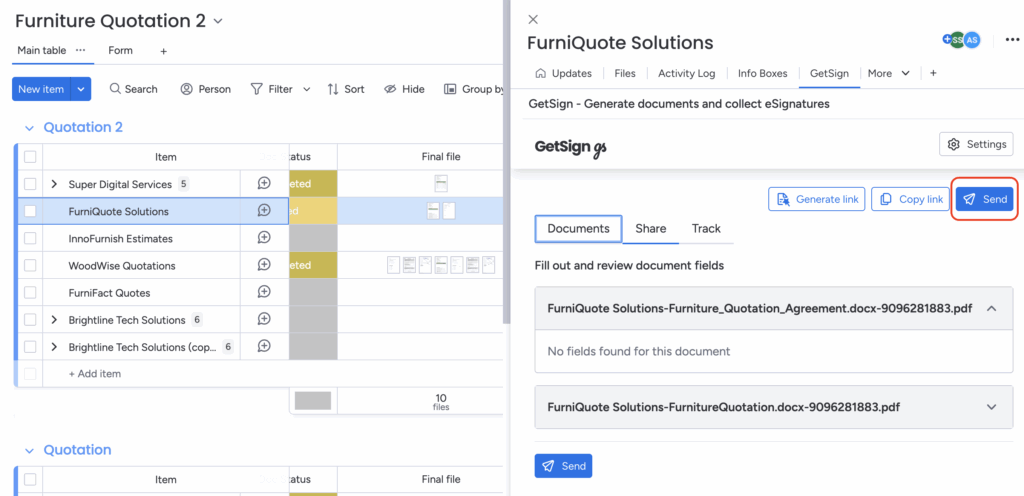
1. Click “Send”
Dispatch your quote or invoice via email, or copy the link to share through another channel (e.g., chat or CRM).
2. Real-Time Updates
Recipients can view, sign, and approve your quote or invoice immediately.
The document’s status updates automatically in monday.com, so you know when it’s reviewed, signed, or completed.
Automated notifications help you follow up promptly, reducing delays in approvals or payments.

Signing That Fits Your Board
Use subitems and sub-item columns with GetSign on monday.com
Explore GetSign
Benefits of subitems for monday.com quotes and invoices
- Clear breakdown: List products/services with quantities and pricing
- Automatic math: Totals and taxes are calculated on the fly
- Scalable: Handle single-line invoices or multi-page quotes with ease
- Polished output: Your documents look clean, accurate, and branded
FAQs for monday.com Quotes and Invoices with GetSign
Can I create monday CRM quotes directly from my board?
Yes. With GetSign, you can build professional quotes directly inside monday.com CRM boards. Subitems allow you to configure products, pricing, and client info, turning your CRM into a complete quotes and invoicing solution.
How does GetSign help with monday.com quotes and invoices?
GetSign integrates natively with monday.com so you can generate both quotes and invoices from the same workflow. You don’t need separate tools—everything from proposal creation to signature collection and invoicing happens in one place.
Can I automate monday.com invoicing for recurring clients?
Yes. If you have customers on monthly retainers or subscriptions, you can automate monday invoicing. GetSign pulls data from your board, creates an invoice, and sends it on schedule—no manual work required.
How do subitems improve quotes and invoices on monday.com?
Subitems act as line items in your documents. For example, in a monday.com invoice, you can list each product or service, quantity, price, taxes, or discounts. GetSign then calculates totals automatically, reducing errors and improving accuracy.
Can I use my own quote or invoice template in GetSign?
Yes. You can upload existing templates in PDF or DOCX format. Once uploaded, you can map monday.com board fields (like client name, email, or totals) to the template. This ensures your branding stays consistent across all quotes and invoices.
Can I generate monday.com proposals for clients?
Yes. Beyond invoices, you can use GetSign to send detailed monday.com proposals. Add project deliverables, pricing, and timelines using subitems, and include signature fields for quick approvals.
What happens after I send a monday.com invoice or quote?
Clients receive a branded, signature-ready document. They can sign instantly online, and you’ll see live status updates inside your board (sent, viewed, signed, completed). This makes follow-ups faster and boosts your monday invoices workflow efficiency.
Is GetSign secure for handling quotes and invoices monday.com workflows?
Yes. GetSign is compliant with eSignature and data protection laws (eIDAS AES, ESIGN, UETA, GDPR, HIPAA). Your quotes, invoices, and proposals stay securely managed inside monday.com invoicing workflows—no risky third-party tools required.
Conclusion
With GetSign on monday.com, creating and sending quotes or invoices becomes fast, accurate, and reliable. From subitem line-items to seamless eSignatures, it’s the perfect solution for modern teams managing CPQ and finance workflows inside a collaborative platform.
Start by uploading your template, mapping your columns, and enabling subitems—then let GetSign handle the rest.