Send Automatic Signature Reminders with GetSign
Following up with signers manually wastes time and creates gaps in your document workflow. GetSign now lets you…

Looking for a faster way to collect signatures without waiting on emails? With GetSign’s Document Signing Link on monday.com, you can now generate a document signing link and send it through any channel — WhatsApp, Slack, or even SMS. Whether it’s an NDA, offer letter, invoice, or approval form — this method is perfect when there’s only one signer involved.
In this how to guide, we’ll show you exactly how to generate and share these signing links with your clients or teammates, and track every signature — manually and automatically — right from your monday.com board.
A signing link is a unique URL that allows anyone with access to sign a document without the need for back-and-forth email threads or attachments. Simply create your template in GetSign, generate a signing link, and share it through email, chat, CRM, or any other platform.
No additional logins. No software installations. Just a click-to-sign experience.
One can generate links and get document signed directly when share via link, some of the basic use cases of document signing link on GetSign are as follows:
Send out marketing proposals, SOWs, or campaign plans via link to fast-track sign-off from clients.
Share onboarding agreements with vendors by link so they can sign anytime, without needing platform access.
Have internal teams or project approvers sign policy updates, compliance forms, or audits by link.
Send one signing link to multiple recipients during policy rollouts, team training consent, or annual compliance declarations.
Below is the how to and video tutorial guiding you to generate the signing link and collect signatures

Once done, select an item from your board to get started.
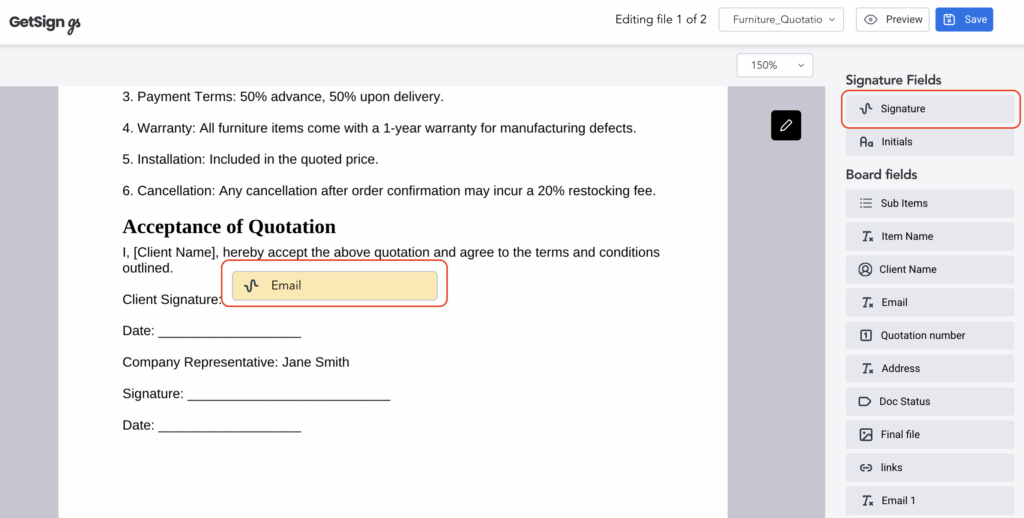
This ensures your signer will have the required field to complete the document.
If you need to quickly send a signing link without automation:

You can now copy and share this link via Email, WhatsApp, Slack, or any other messaging app.
To make the process scalable, set up automation so the link is generated when an item’s status is changed.
Now, every time you change the item’s status to Done, the signing link will automatically be generated and stored.
Every signature action updates live:
Can I use the same link for multiple signers?
No. Each signing link supports only one signer per document. If you need multiple people to sign, you’ll need to create separate instances for each signer.
Are the links secure?
Yes. Each session is encrypted, and access is logged.
Can I revoke or expire a link?
Yes. You can manage and deactivate links at any time from your template settings.
Does this require recipients to sign in?
No. Signers do not need a GetSign or monday.com account.
Are links mobile-friendly?
Yes. All links are optimized for mobile, tablet, and desktop.
GetSign’s Document Signing Link gives your team a faster, easier way to collect eSignatures—with full visibility, legal compliance, and zero manual follow-up.
Whether you’re sending contracts, policy forms, or client approvals, sharing a secure link saves time and centralizes everything in one place.
Start using signing links today and simplify your signature collection process.
Generate, send, sign and track documents without leaving your workflow.