GetSign MCP is now live. The AI-Native document workflow layer for your team. 🎉

Your end-to-end document workflow on monday.com

Generate, sign, send, and track every document your team handles. From your board or from any AI agent. One platform for the entire document lifecycle.

Free to start No per-seat pricing Full audit trail
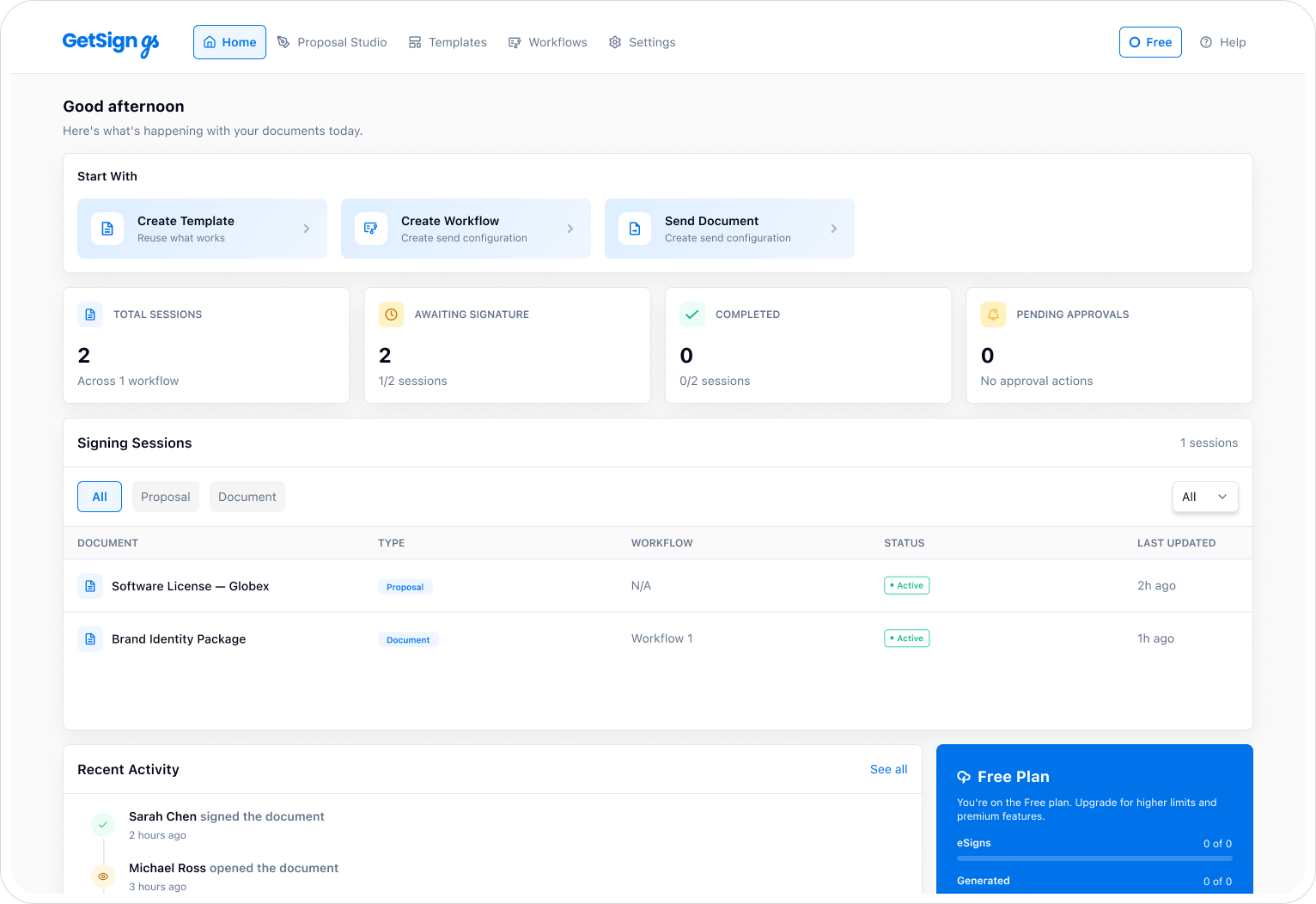
GetSign homepage product view
Your workflow, your way

Use GetSign from the board. Or from a conversation.

Two interfaces, one governed document engine. The same capabilities, whichever way your team works.

Board View

Your document command center inside monday.com.

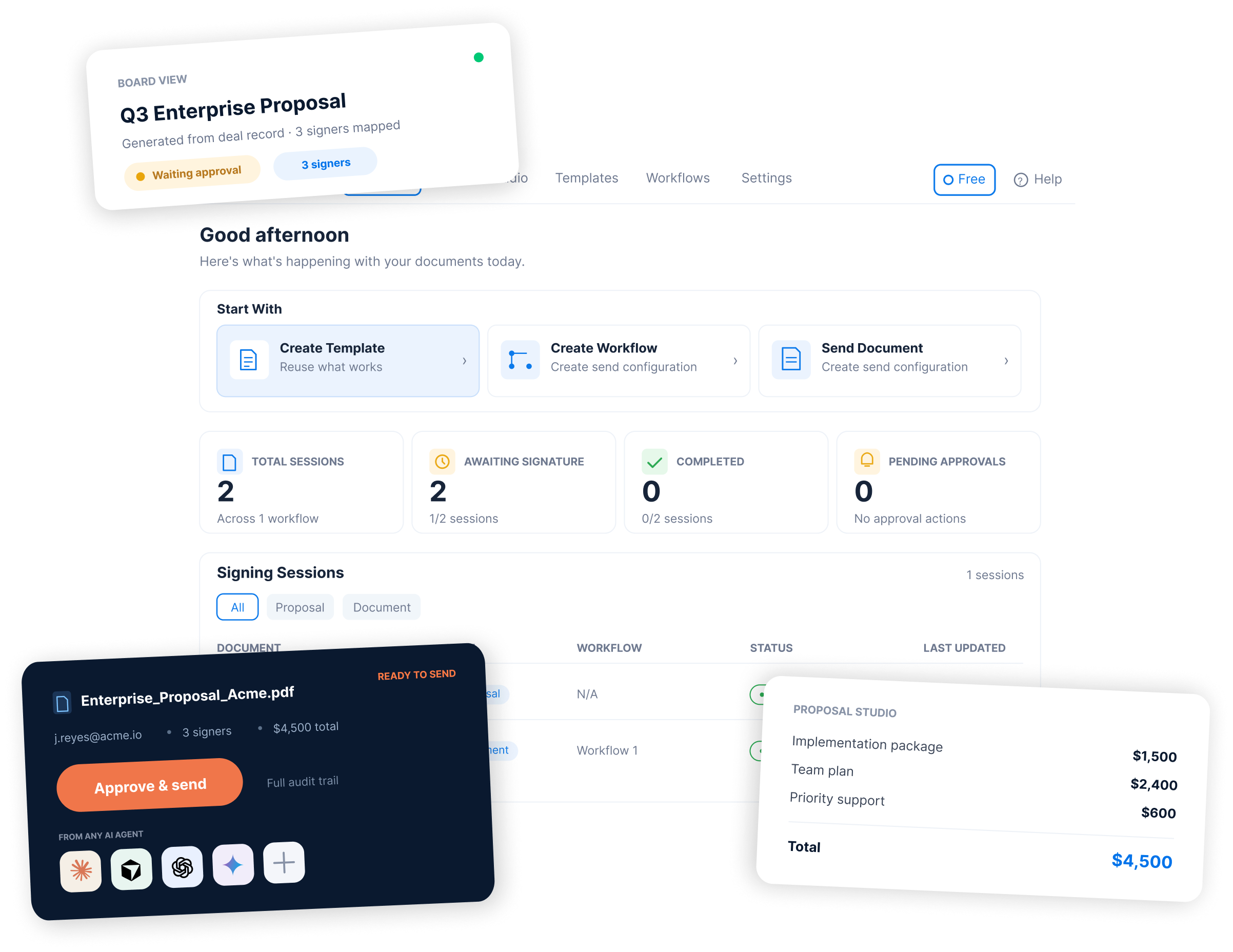
See every document across every item on one screen. Generate, send, track, and manage signing sessions without opening individual items. Board View replaces scattered item-level work with a centralized workspace.

Board-wide document status at a glanceProposal Studio with AI-powered CPQReusable workflows and templatesBatch operations across items
GetSign · Board View
GetSign Board View
GetSign MCP

Run document workflows from any AI agent.

Connect GetSign to Claude, ChatGPT, Cursor, or any MCP client. Describe what you need in plain language. The agent reads your board, prepares the document, and waits for your approval before sending.

Works with:
Claude ChatGPT Claude Code Cursor Codex VS Code

Generate and send

Create contracts, proposals, and agreements from board data through a single instruction.

> Send the renewal for the Acme Industries deal

Track and follow up

Ask who has signed, who is pending, and what needs attention across any board.

> Who still needs to sign on the Q3 deals board?

Build workflows

Set up signing order, reminders, OTP verification, and approval gates by describing what you want.

> Create a workflow with OTP and two-step signing order
Capabilities

Everything your documents need.

Six capabilities that cover the full document lifecycle inside monday.com.

Document generation

Auto-create contracts, proposals, invoices, and letters from live board data. Map fields once, generate on demand.

Learn more →

eSignature

Legally binding electronic signatures with full audit trails, tamper-evident sealing, and global compliance.

Learn more →

Web forms

Collect data, documents, and signatures through guided forms. Responses flow directly into your monday.com board.

Learn more →

Payment collection

Request Stripe payments alongside signature requests. Collect payment and sign-off in a single step.

Learn more →

Batch signing

Need dozens or hundreds of people to sign the same document? Batch Signing makes it happen in minutes, not days.

Learn more →
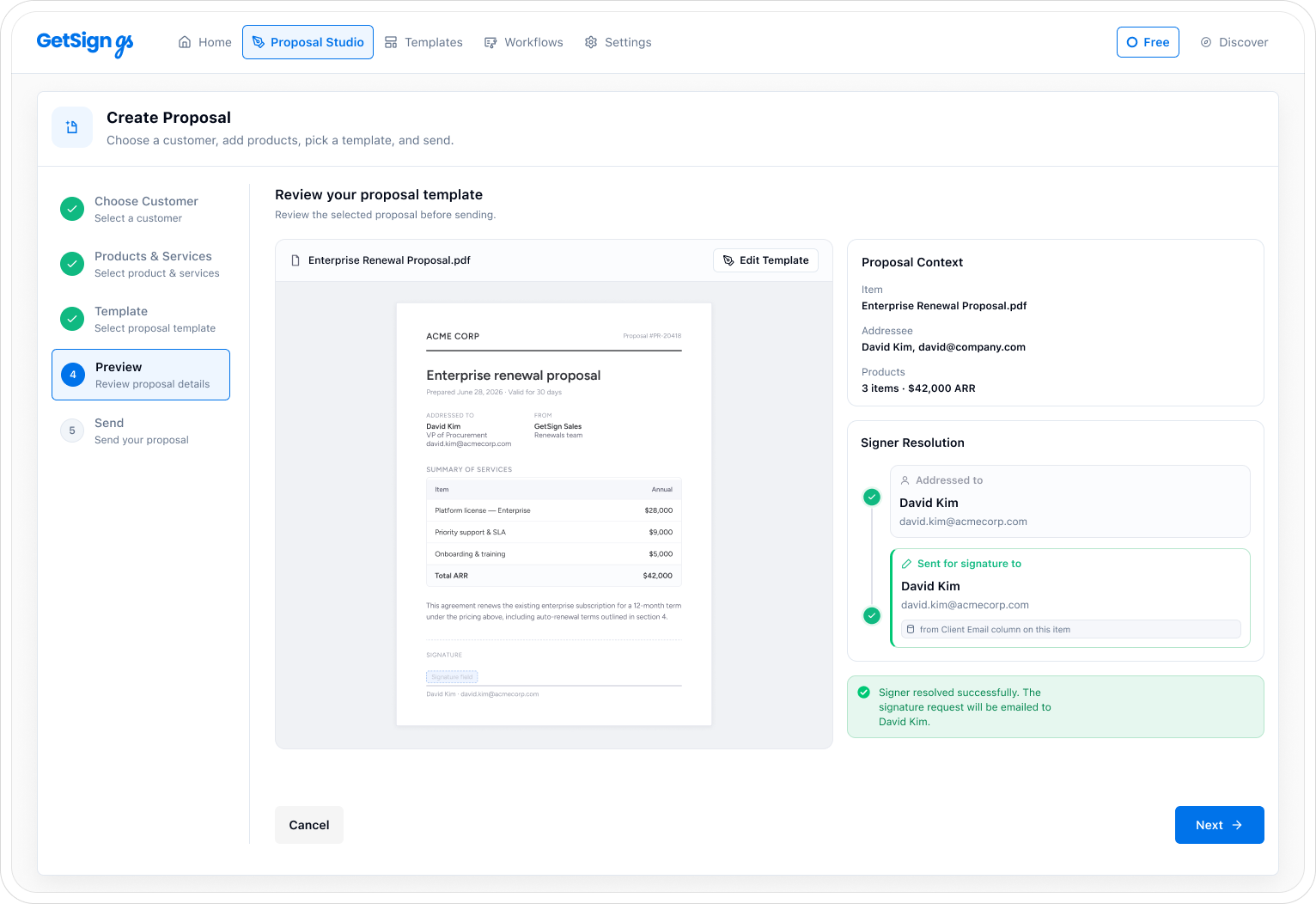
Proposal Studio

Turn board data into accurate proposals.

Pull products, contacts, and terms from your monday.com board. AI detects fields, calculates totals, and prepares a quotation ready for signature.

Proposal Studio Send proposal
GetSign Proposal Studio
1 Live board data

Products, contacts, and values come from your existing columns. No re-entry.

2 AI-powered CPQ

Accurate pricing with quantity breaks, discounts, and tax logic built in.

3 One-click send

Review the proposal, approve, and send for signature. All from the same screen.

Ready to see GetSign on your own board?

Install GetSign, connect a board, and generate your first document in minutes.

Add to monday.com
Built for every team

One platform, every team's documents.

Sales, HR, Legal, Finance, and Operations teams use GetSign to standardize how documents move through monday.com.

Sales

Generate proposals, agreements, and renewals from deal data. Track signing status across your pipeline.

Explore →

People

Send offer letters, onboarding forms, and policy sign-offs from your HR board. No more chasing paperwork.

Explore →

Legal

Route NDAs and contracts through approval gates. Maintain audit trails and compliance records automatically.

Explore →

Finance

Create invoices and purchase orders from project boards. Collect payment acknowledgment alongside signatures.

Explore →
1,380+ document workflows · 488+ forms

Find your document. See how GetSign handles it.

Search the real GetSign library — every result below links to a live workflow or form page.

Showing 6 of 488 documents

Form Tax and Compliance Forms

1099-MISC form

Finance managers collect payer TIN, recipient TIN from recipients of miscellaneous income (rents using a 1099-MISC form before the next stage can begin. GetSign…

See the form →
Form Tax and Compliance Forms

1099-NEC form

Finance managers use a 1099-NEC form to formalise tax and compliance forms details and get sign-off before the process moves forward. GetSign pre-fills it…

See the form →
Form Product and Intellectual Property

A/B test approval form

An a/B test approval form captures feature, product, release — required whenever product and intellectual property needs a complete, signed record on file. GetSign…

See the form →
Form IT and Security

Acceptable use policy form

An acceptable use policy form captures employee name, employee ID, policy version — required whenever IT and security needs a complete, signed record on…

See the form →
Form Financial Services and Banking

Account opening form

An account opening form captures applicant name, entity type, registered address — required whenever financial services and banking needs a complete, signed record on…

See the form →
Form Customer Success Renewals

Account ownership transfer form

CSMs collect account, renewal date from customers and account owners using an account ownership transfer form before the next stage can begin. GetSign pre-fills…

See the form →

Security and compliance

Enterprise-grade security, built in.

Every signature, every document, every workflow is protected by the same security standards used by regulated industries.

AES-256 encryption

Documents are encrypted at rest and in transit with TLS 1.2 and AES-256 encryption.

Full audit trails

Every action is timestamped and recorded. Who viewed, signed, and when, down to the second.

Digital signatures

Tamper-evident sealing with certificate-based digital signatures for maximum legal validity.

OTP verification

Add a one-time password check before signing to verify signer identity.

Role-based access

Control who can send, sign, and manage documents with granular permission settings.

Document expiration

Set time limits on signing requests. Expired documents are automatically locked.

Trusted by 4,000+ teams

Teams across 50+ countries rely on GetSign.

See why thousands of teams choose GetSign for eSignatures and document workflows on monday.com.

Why GetSign

What makes us different.

100% native to monday.com

GetSign lives inside your boards. It syncs with your columns, automations, and workflows without any external context switching.

Pay only for what you use

No per-seat pricing and no wasted licenses. A usage-based model that scales with your actual document volume.

Support that shows up

Real humans, fast responses. From onboarding to troubleshooting, the team works alongside yours to get your workflows running.

How it works

Three steps. Any document.

01

Connect your board

Install GetSign on your monday.com account. Open Board View on any board where you manage documents.

02

Prepare and map

Upload a template or build in Proposal Studio. Map fields to your board columns. AI detects signature placement automatically.

03

Send, sign, track

Send for signature with one click. Track every document from Board View. Signed copies sync back to the board item.

FAQ

Frequently asked questions

Common questions about GetSign, Board View, and GetSign MCP.

GetSign is a document management app built natively for monday.com. It handles document generation, electronic signatures, web forms, payment collection, and workflow automation, all from inside your boards.

Board View is a centralized workspace inside monday.com where you can see, manage, and act on every document across your board. It replaces the need to open individual items to check document status, send for signature, or manage workflows.

GetSign MCP connects your monday.com document workflows to AI agents like Claude, ChatGPT, Cursor, and other MCP-compatible clients. You describe what you need in plain language, and the agent handles generation, sending, and tracking. Authentication is OAuth-based, with no API keys to manage. The agent always waits for your approval before making changes.

Proposal Studio is a CPQ (Configure, Price, Quote) tool inside GetSign that lets sales and procurement teams build accurate proposals and quotations. It pulls products, quantities, and pricing from your board data, applies discount logic, and generates a document ready for signature.

The best document signing app for monday.com is GetSign, since it is fully integrated, compliant with global eSignature standards, and designed to handle everything from document generation to secure signing and tracking—all without leaving monday.com.

monday.com document management with GetSign goes beyond simple storage. You can auto-generate contracts, proposals, HR files, and invoices, route them for approvals, and track every stage of the signing process—all inside your monday.com boards. With features like secure storage, audit trails, and automated workflows, GetSign turns monday.com into a powerful document hub that saves time, reduces errors, and keeps your team fully aligned.

Yes. GetSign produces legally binding electronic signatures compliant with ESIGN Act, UETA, eIDAS (Advanced Electronic Signatures), GDPR, HIPAA, and FDA 21 CFR Part 11. Every signature includes a full audit trail with tamper-evident sealing.

GetSign uses a usage-based pricing model. You pay for document sends, not per seat. There is a free tier to get started. No credit card required.

Yes. You can send a single document to multiple signers in parallel or set a specific signing order. GetSign also supports batch signing, where you send multiple documents to multiple recipients in one operation.

Yes. GetSign MCP connects to any MCP-compatible AI client. You can generate documents, send for signature, track status, and build workflows by describing your intent in a chat. No API keys needed. The agent authenticates through OAuth and always waits for approval before executing changes.

Install GetSign, connect it to your board, then map signature fields in a template.

With GetSign, you can send a single document to multiple signers directly in monday.com. You can choose whether all signers sign in parallel or set a specific signing order, making the process flexible for contracts, approvals, or team agreements.

You can automate document generation and approvals in monday.com using GetSign. Simply set up workflows where documents are auto-generated from board data and routed for approval with pre-defined rules. This ensures faster sign-offs and reduced manual work.

Document generation on monday.com means creating contracts, proposals, agreements, or HR letters directly from board data without leaving monday.com. With GetSign, you can build templates, auto-fill details, and generate ready-to-send documents instantly.

To create a form in monday.com, you can turn any board into a form and share it with your team or clients. The responses automatically populate the board, and with GetSign, you can connect forms to workflows that generate documents or trigger signature requests.

Start automating your documents today.

Free to start. No credit card, no per-seat fees. Add GetSign to your monday.com account or connect through your favorite AI agent.