Before this update, adding sub-items to a PDF template automatically imported all sub-item columns from the board. This created cluttered documents containing internal tracking columns that weren’t meant for clients or external parties.
Teams needed a way to choose only the relevant sub-item fields to present.
How This Feature Improves Your Workflow
- Invoices/Quotes: Show only product, quantity, and price while hiding internal cost or margin fields.
- Project Task Breakdowns: Include only task name and due date.
- Procurement: Display vendor-facing fields and omit internal approval data.
This makes generated PDFs cleaner, more focused, and more professional.
How It Works
Users can now choose exactly which sub-item columns to include.
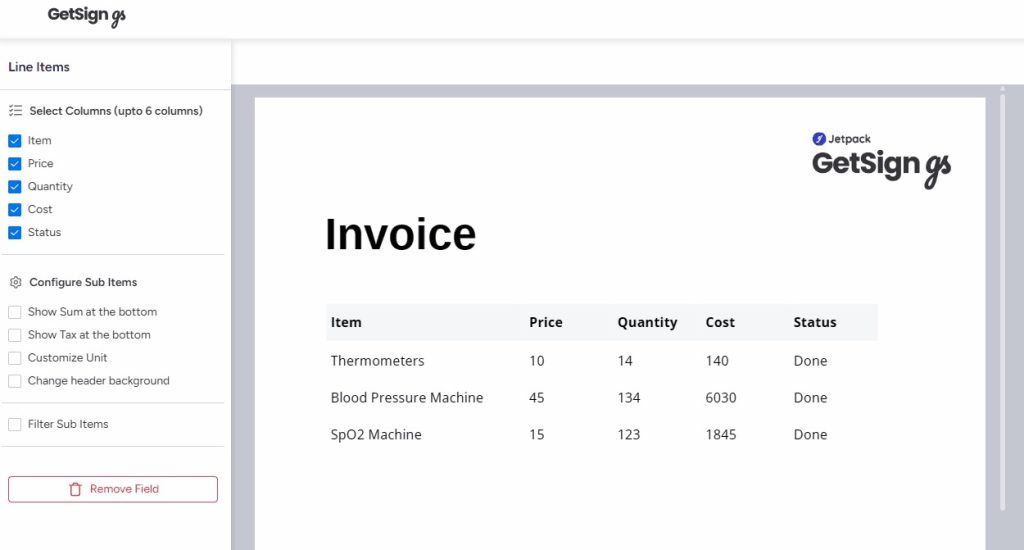
Selecting Sub-Item Columns
- Open your GetSign PDF template.
- Drag the Sub-items element onto the template.
- On the right-side configuration panel, you’ll see a list of sub-item columns.
- Use checkboxes to select only the columns you want.
- (Optional) Use existing filters to control which sub-items appear.
- Save your template.
Only the selected columns will now appear in generated documents.